ORGIS
Every chat app in one queue, sorted by what needs a reply first.
- Context
- strAIght up! Hackathon, team of three, with Leu Chun Yang and Ethan Chuwa
- My part
- The first build (import parsers, triage logic, dashboard), the README and the pitch
- Stack
- Next.js, TypeScript, OpenAI, Vercel AI SDK, Zod, Beeper, MySQL
- Year
- 2026
The problem
A student, founder or organiser gets asks from five places in the same hour: a client on WhatsApp, family on Telegram, a noisy Discord, a Slack reminder. Receiving them isn’t the hard part. Deciding which one deserves attention now is, and that means opening every app, scanning every badge and guessing.
Summaries don’t fix it. A summary still leaves the reader to work out urgency across twenty chats. What helps is one queue that has already decided what needs a reply first, says why, and lets you reply from there.
How it works
ORGIS (Organised Real-time Global Inbox System) reads the chats Beeper already unifies, through Beeper Desktop’s local API, and turns them into one inbox.
- SyncA sync route or a polling listener reads the latest chats and their newest messages. Each chat remembers the last message it handled, so a poll only processes what is new.
- BurstsConsecutive messages from the same sender within 15 seconds of each other become one item, so “hey” / “are you free” / “need the deck by 3” is triaged as the single request it is.
- StorageMessages, triage results, pins, preferences and per-chat state live in five MySQL tables. Inserts are idempotent, so syncing the same messages twice stores nothing new.
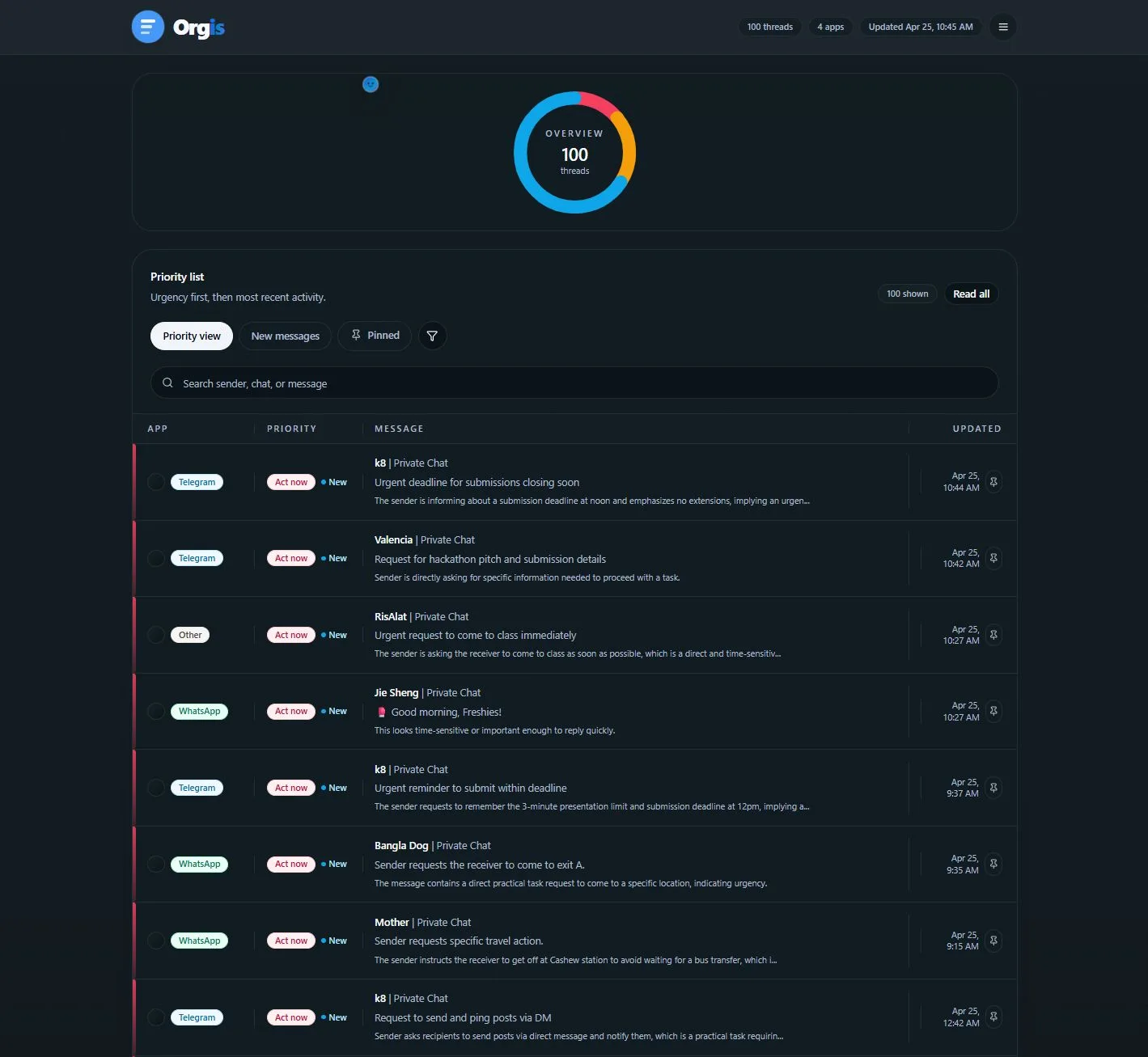
- TriageEach item gets red, yellow or green, shown as Act now, Review soon and For later, with a one-line summary and a reason.
- ActSearch, source filters, pins and read state; a drawer with the summary, the reason, the original text and a reply box that sends back through Beeper; a browser notification when a new red item arrives.
Three buckets, defined for the model
The model is told what each colour means in terms of the reader’s next move, not how important the sender is. It returns a colour, a summary of at most 220 characters and a reason of at most 180, validated by a Zod schema, at temperature 0.
Red
Shown as Act nowMeans The sender is asking the reader to do something practical (send, review, confirm, fix, book, pay, reply), or it is time-sensitive
Yellow
Shown as Review soonMeans Worth replying to, but it can wait and needs no immediate action
Green
Shown as For laterMeans Informational, no action needed, or content with no actionable request
| Bucket | Shown as | Means |
|---|---|---|
| Red | Act now | The sender is asking the reader to do something practical (send, review, confirm, fix, book, pay, reply), or it is time-sensitive |
| Yellow | Review soon | Worth replying to, but it can wait and needs no immediate action |
| Green | For later | Informational, no action needed, or content with no actionable request |
The prompt also closes an obvious hole: abusive, sexual or harassing messages are not red just because they are loud. Unless there is a real practical request inside them, they go to green.
When there is no model
Without an API key, or when the model call throws, triage falls back to local rules so the inbox keeps sorting. The rules scan for three families of phrases and apply them in order of increasing precedence: low-priority cues first, then review cues, then urgent ones, so a message that says both “FYI” and “need this today” ends up red.
let priority = "review_soon";
if (laterSignals.some(p => p.test(cleaned)))  priority = "for_later";
if (reviewSignals.some(p => p.test(cleaned))) priority = "review_soon";
if (urgentSignals.some(p => p.test(cleaned))) priority = "act_now";Two personal modes sit above both paths. With “family always red” or “business always red” on, a message whose sender, chat or text points to family or work is red before the model is asked at all.
Who did what
Three of us, with the work split by layer.
- MeThe first working build: the inbox model, parsers that normalise text, JSON and CSV imports into one item shape, the first triage logic with its schema-validated route and fallback rules, and the first dashboard. Then the rebrand to ORGIS, the README and the pitch deck.
- Chun YangThe Beeper integration: sync, MySQL storage, burst grouping and the multi-line detector, triage on synced messages, and the family and business modes.
- EthanThe final interface: the dashboard redesign, replies and read state, clear-read, and wiring the front end to the backend.
Decisions
Triage, not summarise
The output a person needs is an order to read things in, so the model’s main field is a colour and the summary and reason explain it. Every item states why it is where it is, which is what makes a queue trustworthy enough to skip the apps.
Group bursts before judging them
People send one thought as five lines. Triaging each line alone makes the urgent last line look like noise and the greeting look like a request. Merging same-sender messages within 15 seconds hands the model what a person would read.
Keep working without a key
A missing key, an outage or a bad response shouldn’t stop the inbox from sorting. The fallback is crude on purpose: readable rules that always return a valid colour, summary and reason in the same shape as the model’s.
Personal modes are rules, not a model preference
Chun Yang first tried letting the model decide when family or work mattered, but on the few samples we had it was not accurate. Forcing those messages red when a mode is on is predictable, and the reason says a mode did it.
Don’t reply for the user
The prompt says it plainly: classify, do not write a reply. ORGIS decides what to look at and puts a reply box next to it; the words stay the person’s.
Results
3
Buckets, each with a summary and a reason: Act now, Review soon, For later
15 s
Window for grouping one sender’s consecutive messages into a single item
5
Source labels in one queue: WhatsApp, Telegram, Discord, Email and Other
A hackathon build run on our own Beeper accounts. We never measured triage accuracy against labelled messages or timed how much faster people found their urgent message, and the README’s demand table was left for interviews we didn’t finish. There are no automated tests.
Limits
- The Beeper fallback treats a bare “please” or “can you” as urgent, so without a model a lot of ordinary messages land in Act now.
- The family and business modes match keywords such as “home”, “team” or “work”, which catch plenty that isn’t family or business.
- Source detection reads Beeper account ids and only knows four platforms; Slack messages from Beeper show up as Other.
- No authentication and one local MySQL database: it is a single-user tool for the person running it.
- Triage runs once per item during sync, in sequence, so a large first sync is slow.
Up next
All work